
Free Template Maker & Generator
Turn Photos into Stencils Online
Convert a photo into a two-color stencil preview in your browser. Adjust edge strength and threshold, then download a PNG or experimental SVG for your craft project.
No account or software installation needed — Preview, adjust, and test before cutting
No registration required • Completely free
Online Template Maker & Creator
Upload a browser-supported image and adjust your stencil preview. Start with JPG or PNG for predictable results.
Upload & Generate Your Template
Adjust a two-color preview from your image
Try a tutorial example
Load a source and its exact tutorial settings in one click. This replaces your current image. Portrait and cat sources are licensed Unsplash photographs; the landscape belongs to the site maintainer.
Select an example or upload your own image below.
See It In Action
Actual output at edge strength 0.5 and threshold 130, with black background and white foreground. Your result depends on the source image and settings.

Original Image
Complex photo with colors, textures, and fine details
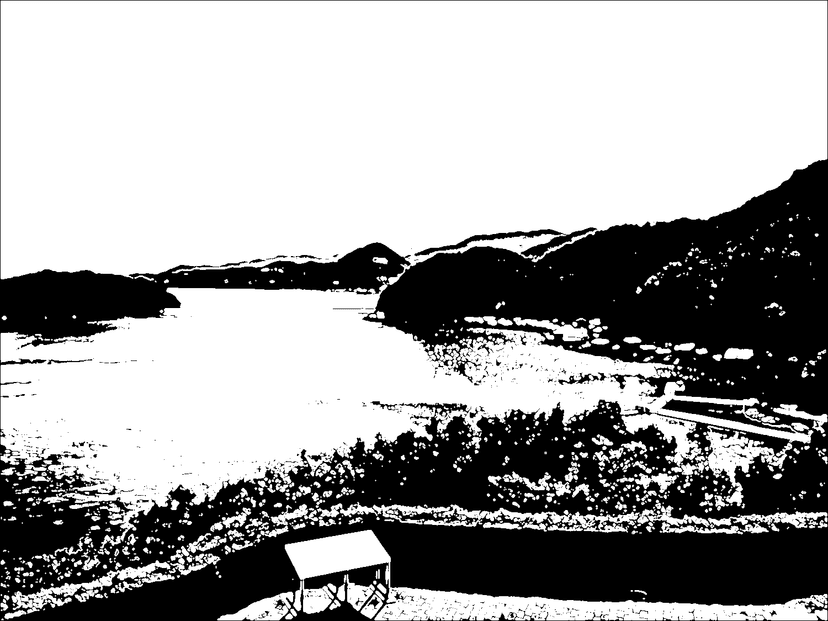
Stencil Template
Two-color preview; inspect and test before cutting or printing
Ready to try it yourself?
Upload an image below and compare the preview as you adjust settings.
Original Image
Click to upload image
JPG and PNG recommended; maximum file size 20 MB
Stencil Template
Upload an image to see the stencil preview
Your stencil will appear here
Processing Algorithm
💡 Image Size Performance Tips
• Pixel dimensions matter: A compressed file can still contain millions of pixels.
• Processing time varies: Your device, browser, and image dimensions affect speed.
• If processing is slow: Resize the source in an image editor and upload a smaller copy.
Wait for the preview to finish before changing another setting. There is no fixed processing-time guarantee.
Compare three practical stencil case studies with downloadable sources, settings, and manual bridge instructions.
Why Choose Our Stencil Generator?
Adjustable image conversion, local processing, and guides to help you inspect the result.
Easy Image Upload
Choose a JPG or PNG with clear subject separation. Other image formats depend on your browser; animated images are processed as a single frame.
Adjustable Stencil Preview
Edge detection and local thresholding create a two-color preview. Adjust edge strength and threshold to balance detail and simpler shapes.
PNG and Experimental SVG Export
Download PNG for printing, or experimental SVG for further editing. SVG paths require inspection and cleanup before use with a cutting machine; compatibility is not guaranteed.
Browser-based Processing
Processing time depends on image dimensions and your device. Try a smaller source image if the browser becomes slow.
Live Preview
See your template update in real-time as you adjust settings. PNG preserves the raster preview; experimental SVG paths need a separate check.
Local Image Processing
This tool processes your uploaded image in your browser rather than sending it to our server. The site also uses Google Analytics and AdSense; see our Privacy Policy.
From Image to Stencil in 3 Simple Steps
Upload, adjust, and inspect a two-color stencil preview
Upload Image
Choose any image from your device. The clearer the image, the better the stencil result will be.
Adjust Settings
Adjust edge strength and threshold, then inspect the preview for missing details and isolated shapes.
Download & Create
Download PNG or experimental SVG. Check isolated shapes, print a test, and edit cutting paths if needed.
Help Us Improve
Your feedback helps us make the Stencil Generator better for everyone
Join Our Community
Connect with other users, share your creations, report bugs, and suggest new features in our Reddit community.
Visit r/StencilGeneratorDirect Contact
Have a specific issue or suggestion? Send me an email directly and I'll get back to you as soon as possible.
Whether you found a bug, have an idea for a new feature, or just want to share how you're using the Stencil Generator, we'd love to hear from you!
Ready to Transform Your Images?
Create a stencil preview from your own photo, then check the result before printing or cutting.
Explore a two-color stencil preview — free to use, no signup required
✓ No registration needed ✓ Adjustable preview ✓ 100% free